“An interactive web design is a design for websites which uses other inbuilt software, modules or features aimed at creating an environment for a website or web application user to be actively engaged during visit or use as the case may be, thereby improving his or her user experience (UX).” (Study.com, ND)
Human interactions can enhance website design and allow an engaging user experience. Benefits of interactive web design include: Better engagement, Increased time spent on your website, creative approaches and easier intuitive navigation.
Some simple forms of interactive design include search bars, navigation links, buttons, scroll effects and videos. Interactive elements add a responsive and personalized user experience (WebFX, ND)
Storyboards
To make the website more interactive, I would like to include animations and moving elements as a way to engage the user and present visuals in a dynamic manner. I have made storyboards to display ideas on how I may achieve this and to plan the order of my animation.
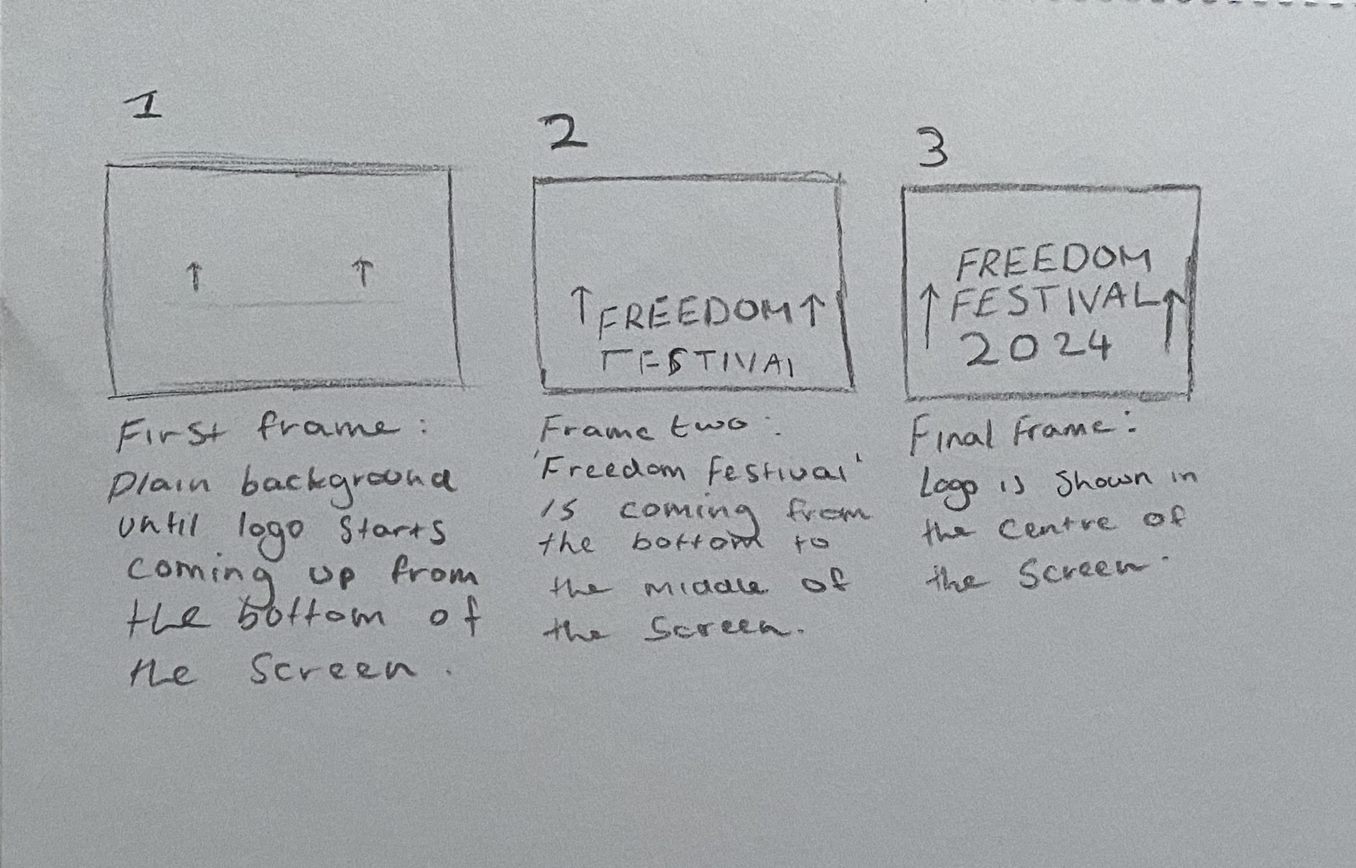
A simple animation of my logo rising up
Here is a simple storyboard detailing an animation for my logo. The sequence is short but adds dynamism to the logo by having it float into the frame before settling into position. I have chosen to animate my logo because it could be an animation that happens when entering the website, creating fluidity and intrigue in the user as soon as they are on the website.
Using After Effects, I took the concept from my storyboard and made it into an animation. The process was fairly simple and just included a shape mask for the text to come out from under to create the effect of it sliding up. I used the ease-in and ease-out tools to create some bounce and energy to the text when it rises before settling into a fixed position. I think this would be effective on my website design as it is a subtle animation which doesn’t feel distracting.
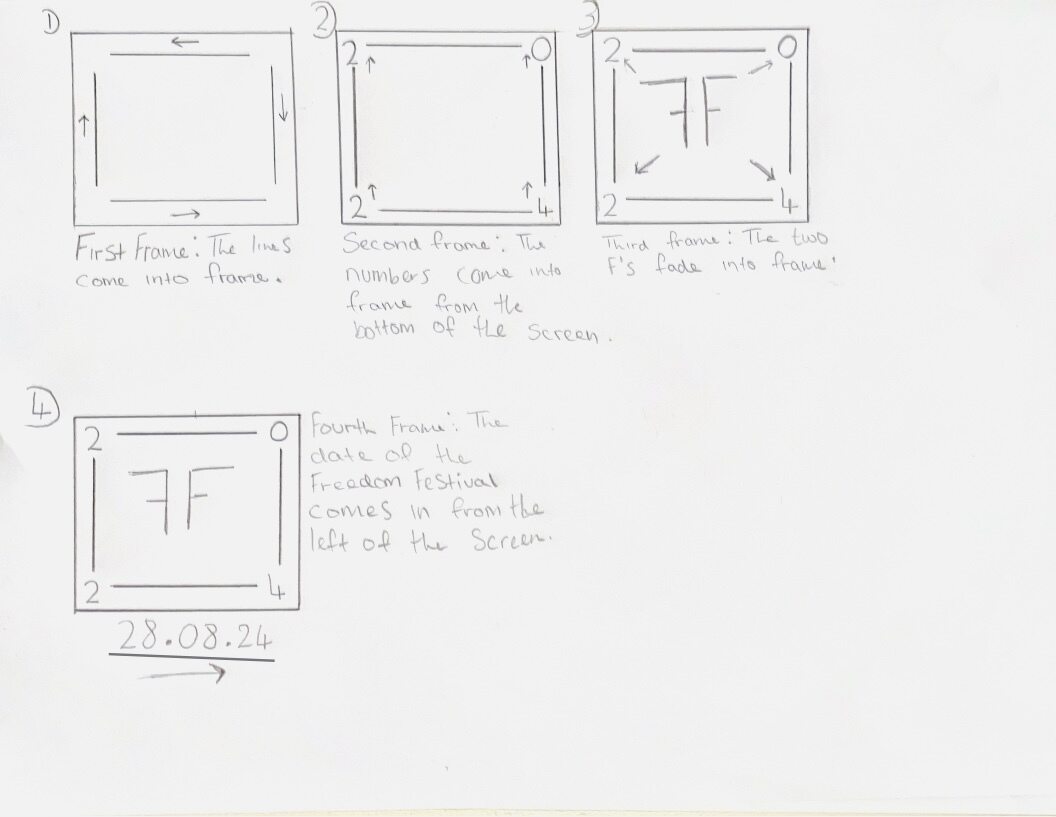
A second storyboard for an animation of my secondary logo
I made another storyboard for my secondary logo, similar to how I did one for my primary logo.
Because my secondary logo has more elements, I was able to create a more sophisticated sequence which takes the user through more of a visual journey. The first step is the lines extending from each corner in different directions. Then the numbers float up in sync, using the same technique as my first animation. The animation ends with the two F’s floating into the frame, and the date of the festival sliding in from the left, underneath the logo.
Though I haven’t had chance to properly animate this in After Effects yet, it is something that I would like to include in my website or on social media. Because it uses more steps and takes the user through a process, I think it would be highly engaging and beneficial to the user experience.
Search Bar
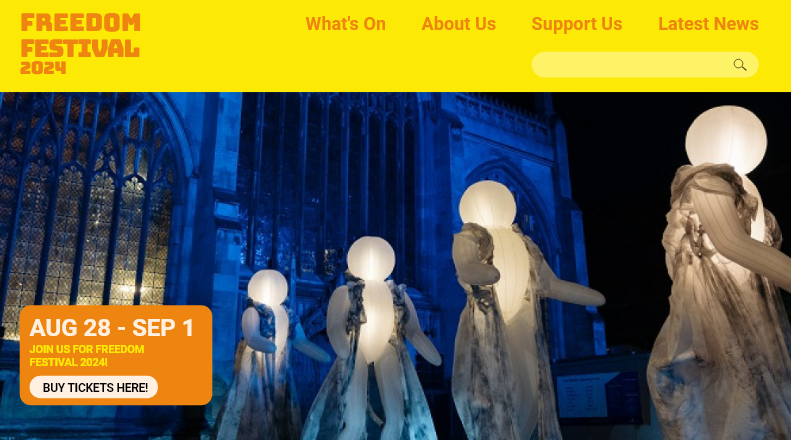
I have added a search bar to my website mockup
I would like to add a search bar to my website because it is a good way to add some user interaction and can be helpful when users are trying to navigate the website. I have added one in to the navigation on my high fidelity mockup to demonstrate how it may look. To make this even more interactive, I could add a toggle effect so the search bar can be made bigger and smaller when clicked on.
Some other ideas I have are sections of the website which fade in as the user scrolls down. This will be something that I test out when I begin to wire up the site for my final version, so that the animation can be seen as part of a functional prototype.
Reference List:
Study.com (ND) Interactive Web Design [Quote]. Available online: https://devrix.com/tutorial/how-to-use-interactive-design-website/#:~:text=The%20benefits%20of%20good%20website%20interaction%20design%20are,the%20site%20and%20about%20your%20business.%20More%20items [Accessed: 19.11.2023]
WebFX (ND) How to Make Website More Interactive in 13 Steps [Article]. Available online: https://www.webfx.com/web-design/learn/how-to-make-website-more-interactive/#:~:text=13%20elements%20of%20a%20successful%20interactive%20website%20design,tools%20…%208%208.%20Feedback%20…%20More%20items [Accessed: 19.11.2023]