EX3: Incorporating principles of UI/UX design and user-friendly interfaces with Adobe XD
“Give visual cues to users that facilitate easy navigation with reference points across the interface to seamless navigation. Never leave users guessing or wondering which screen he is or how he landed on the screen. Instead, users should be provided with cues or power of predictability to help predict the result of an action” (HiddenBrains, 2021)
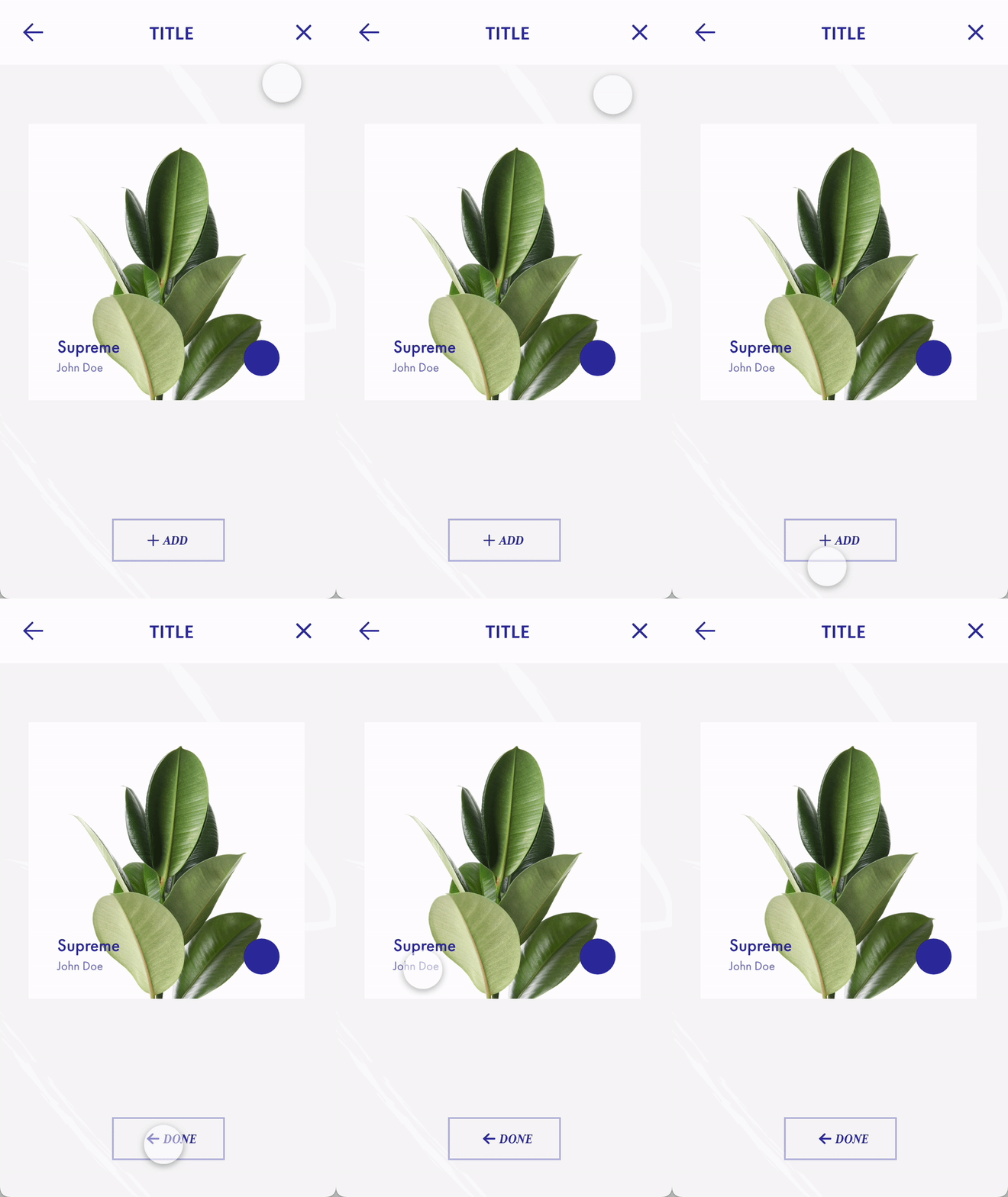
One principle of UX/UI design is predictability. Users should be able to understand what each button / action will do and they should feel assured after doing something like clicking a button. In this GIF, I show how using component states in XD can create clarity by changing the state of a button when clicked on to tell the user that the result of their action has processed. This stops them from constantly clicking which can crash the website or app.
Component states show users that their action has gone through (click image if the GIF isn't working)
The user clicks the ‘add’ button, and the app responds by changing the button to now say ‘done’, with an arrow pointing back to take them to the previous page. This tells them the plant has been added and they can go back to add more plants. Adding icons for a back button or a cross button at the top of the interface also instills predictability as they will know that this will take them off of this screen. Because it uses icons and not words, it is made more accessible to people who don’t understand English or may have a condition like dyslexia that causes them to struggle reading certain words.
Less choices lead to faster response times and makes the interface easier to navigate
Hick’s Law states that “The time it takes to make a decision increases with the number and complexity of choices” (LawsofUX, nd) Too many options can overload users with too much information and means they may find it harder to navigate the website or give up looking for information. For the Freedom Festival 2024 website I have chosen four important sections for the navigation, so the user doesn’t feel as overwhelmed. This means their experience navigating the website will be much easier, and they can also utilize the search button to look for a specific keyword or term if they wish to.
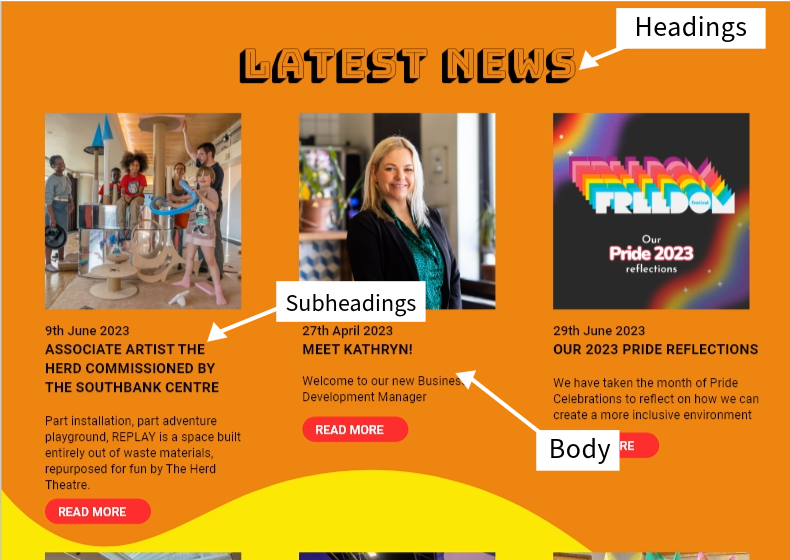
Hierarchy shown by text size and styles
“A visual hierarchy is a way that designers help users navigate more easily within a section or page. To create a visual hierarchy, more important content should stand out.” (Grass, 2021)
Visual hierarchy helps to direct users to information quickly as they can skim through important information and find sections faster. For the latest news section in my Freedom Festival website, I use different fonts and text sizes to direct users to sections based on their order of importance. The heading uses its own typeface and is the largest, as it tells the user where they are on the site. The Headings for each news article are the second largest and use a bold font so users can quickly skim through each title, and if they are interested can read the body text beneath each section, which is a regular font that is lighter in weight as it is not as important.
Desktop Landing
Mobile landing
Consistency across platforms is another principle of UX and UI design as it helps keep the user familiar with both the interface and your brand itself. For my web and app designs I have tried to keep them as similar as possible to prioritise the user experience and make it feel as familiar as possible. This is done by using the same imagery, logo, colours and by having the navigation at the top of the screen still. The only difference is that the navigation is presented as a burger menu on the mobile version as it works better for the smaller format. It would be impossible to comfortably fit the navigation onto one line like the desktop, which is why I have instead done this, it is in the same place though so users will be able to predict that this is the navigation, even if they aren’t familiar with burger menus from other apps.
Reference List:
Grass, Jonny (2021) The 5 Key UX Design Principles You Need to Know [Article]. Available online: https://careerfoundry.com/en/blog/ux-design/5-key-principles-for-new-ux-designers/ [Accessed: 11/12/2023]
HiddenBrains (2021) Essential Principles of UI/UX Designing [Article]. Available online: https://www.hiddenbrains.com/blog/ui-ux-design-principles-best-practices.html [Accessed: 11/12/2023]
LawsofUX (nd) Hick’s Law [Article]. Available online: https://lawsofux.com/hicks-law/ [Accessed: 11/12/2023]